通过PWA,我的博客也能离线阅读啦
前言
我经常看到有些博客站点拥有离线观看的功能,就算是没有网络,刷新页面依然可以获得数据。我对这一功能甚为好奇,了解后才发现这一技术是PWA。
何为PWA
PWA又为渐进式Web应用,在MDN上是这样说的, 渐进式 Web 应用(Progressive Web App,PWA)是一个使用 web 平台技术构建的应用程序,但它提供的用户体验就像一个特定平台的应用程序。它像网站一样,PWA 可以通过一个代码库在多个平台和设备上运行。它也像一个特定平台的应用程序一样,可以安装在设备上,可以离线和在后台运行,并且可以与设备和其他已安装的应用程序集成。
如何实现
构建一个PWA程序主要是用到service worker技术,这一项技术在现代浏览器中默认开启。
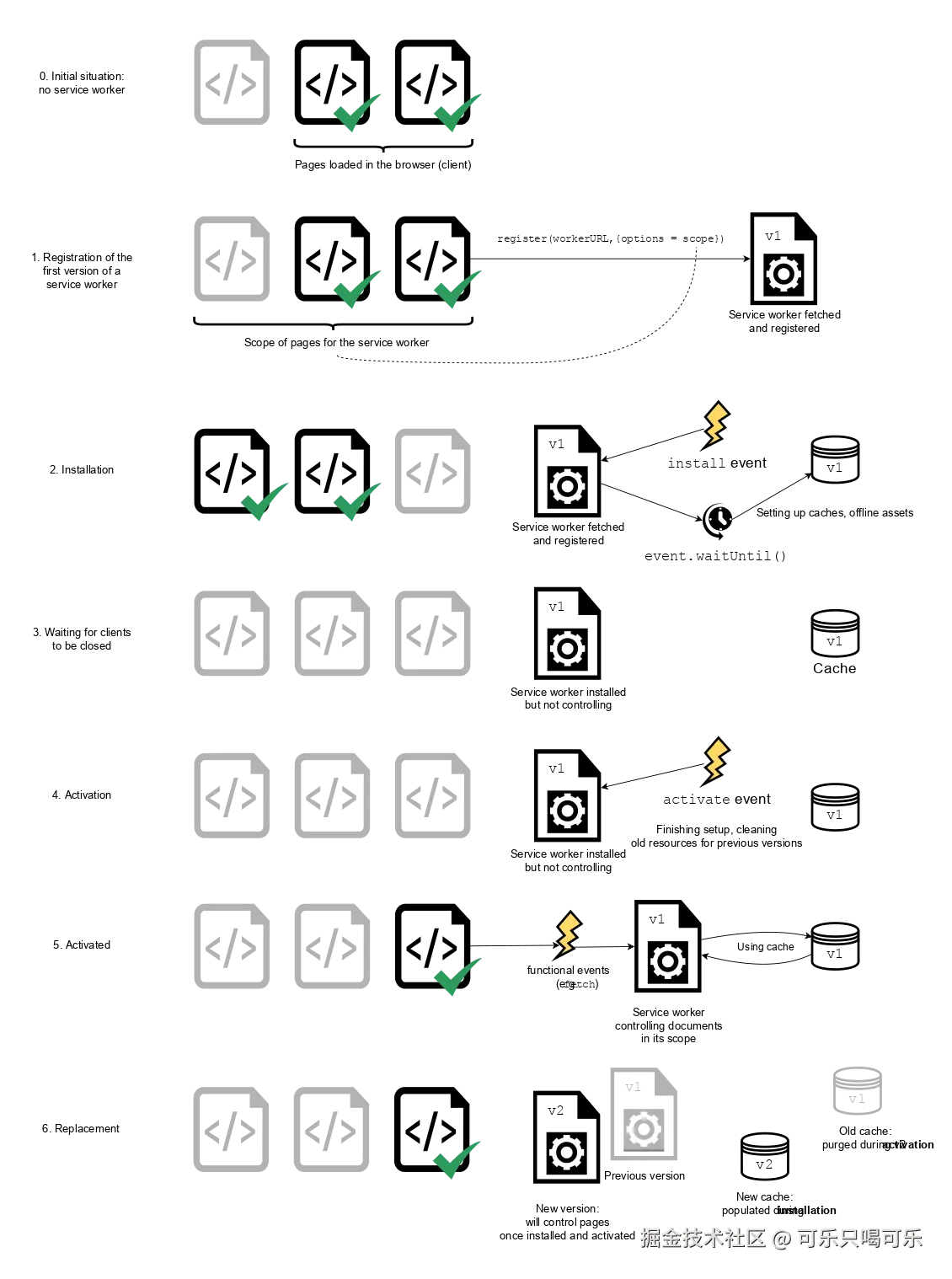 以上是一张官方的图,讲解了
service worker的工作流程,简单来说就是注册程序 --> 安装程序 --> 激活程序 --> 获取数据 --> 版本更新后再次获取数据 。
注册程序
if ("serviceWorker" in navigator) {
navigator.serviceWorker.register("/sw.js");
}
安装程序
- 定义版本号
const VERSION = "v1"
- 定义缓存名称
const CACHE_NAME = `cache-${VERSION}`
- 确定需要缓存的数据
const APP_STATIC_RESOURCES = [
"/",
"/favicon.svg",
"/mainfest.json",
"/offline",
"/sw.js"
];
- 安装程序 在安装程序的时候,将静态资源进行缓存
self.addEventListener("install", (event) => {
event.waitUntil(
(async () => {
const cache = await caches.open(CACHE_NAME);
cache.addAll(APP_STATIC_RESOURCES);
})()
);
});
激活程序
在激活程序阶段,删除之前缓存的老数据
self.addEventListener("activate", (event) => {
event.waitUntil(
(async () => {
const names = await caches.keys();
await Promise.all(
names.map((name) => {
if (name !== CACHE_NAME) {
return caches.delete(name);
}
})
);
await clients.claim();
})()
);
});
获取缓存
进行网络拦截,当有网络的时候就直接获取网络发送的数据,当无网络的时候就获取缓存的数据
self.addEventListener("fetch", (event) => {
const url = new URL(event.request.url);
if (url.protocol === 'chrome-extension:') {
return;
}
if (url.pathname.startsWith('/api')) {
return;
}
if (url.pathname.startsWith('/')) {
if (!navigator.onLine) {
event.respondWith(
caches.match(event.request).then((response) => {
return response || fetch(event.request).then((response) => {
return caches.open(CACHE_NAME).then((cache) => {
cache.put(event.request, response.clone());
return response;
});
}).catch(() => caches.match('/offline'));
})
);
} else {
event.respondWith(
fetch(event.request).then((response) => {
return caches.open(CACHE_NAME).then((cache) => {
cache.put(event.request, response.clone());
return response;
});
})
);
}
} else {
event.respondWith(
caches.match(event.request).then((response) => {
return response || fetch(event.request);
}).catch(() => caches.match('/offline'))
);
}
});
加餐
缓存应用程序只是PWA技术的其中一个功能,PWA还可以进行该网页以exe的形式安装在电脑上,我觉得这个挺好玩的。
比如说我们可以在GitHub上看到这样一个标识,这就是一个可安装的PWA应用程序。

将PWA改造为一个可安装的应用程序员也很简单。我们只需要建一个mainfest.json文件,在这个文件里面配置相关的标题,图标这些,然后在head里面引入。
<head>
<link rel="manifest" href="/mainfest.json" />
</head>
mainfest.json里面的数据如下
{
"name": "krismile🥤 Blog",
"short_name": "krismile🥤 Blog",
"description": "我的博客,记录一些技术与日常!",
"icons": [{
"src": "favicon.svg",
"sizes": "200x200",
"type": "image/svg+xml"
}],
"background_color": "#fff",
"theme_color": "#000",
"start_url": "/",
"display": "standalone",
"orientation": "portrait"
}
总结
就这样我们就通过PWA技术实现了其中的网页的缓存以及安装,这一技术很适合在博客类的程序上使用,可以大大提升其体验程度,当然对于大多数的IAAS应用也是可以的。
如果您觉得这篇文章有帮助,请点个赞吧~
评论
请登录后发表评论
去登录