iNtersectionobserver监听滚动条滚动位置实现图片懒加载
2023-12-20
692 字约 3 分钟
...大家下午好。听说在实现一些需要监听滚动条滚动到某个元素需要执行某段神秘代码的需求时,大伙总是不太乐意,现给大家介绍一个不用监听滚动事件就能完成需求的api,希望能给一点点启发。
废话少说,先上效果
- 懒加载

- 瀑布流

- 视频暂停

上代码
HTML
/* html */
<!DOCTYPE html>
<html lang="en">
<head>
<meta charset="UTF-8">
<meta name="viewport" content="width=device-width, initial-scale=1.0">
<title>Intersection Observer API</title>
<style>
* {
padding: 0;
margin: 0;
}
.wrapper {
display: flex;
flex-wrap: wrap;
}
img {
width: 400px;
margin: auto;
}
</style>
</head>
<body>
<div class="wrapper">
<img src="./imgs/0.png" data-src="https://t7.baidu.com/it/u=1956604245,3662848045&fm=193&f=GIF">
<img src="./imgs/0.png" data-src="https://t7.baidu.com/it/u=4198287529,2774471735&fm=193&f=GIF">
<img src="./imgs/0.png" data-src="https://t7.baidu.com/it/u=1223089837,2011531023&fm=193&f=GIF">
<img src="./imgs/0.png" data-src="https://t7.baidu.com/it/u=2529476510,3041785782&fm=193&f=GIF">
<img src="./imgs/0.png" data-src="https://t7.baidu.com/it/u=727460147,2222092211&fm=193&f=GIF">
<img src="./imgs/0.png" data-src="https://t7.baidu.com/it/u=3779234486,1094031034&fm=193&f=GIF">
<img src="./imgs/0.png" data-src="https://t7.baidu.com/it/u=2763645735,2016465681&fm=193&f=GIF">
<img src="./imgs/0.png" data-src="https://t7.baidu.com/it/u=38705621,4040292245&fm=193&f=GIF">
<img src="./imgs/0.png" data-src="https://t7.baidu.com/it/u=3691080281,11347921&fm=193&f=GIF">
<img src="./imgs/0.png" data-src="https://t7.baidu.com/it/u=309902808,4013662088&fm=193&f=GIF">
<img src="./imgs/0.png" data-src="https://t7.baidu.com/it/u=3915743384,2060495762&fm=193&f=GIF">
<img src="./imgs/0.png" data-src="https://t7.baidu.com/it/u=814015239,3764270914&fm=193&f=GIF">
<img src="./imgs/0.png" data-src="https://t7.baidu.com/it/u=735474575,14049849&fm=193&f=GIF">
<img src="./imgs/0.png" data-src="https://t7.baidu.com/it/u=55748064,2074988836&fm=193&f=GIF">
<img src="./imgs/0.png" data-src="https://t7.baidu.com/it/u=1415984692,3889465312&fm=193&f=GIF">
<img src="./imgs/0.png" data-src="https://t7.baidu.com/it/u=1635608122,693552335&fm=193&f=GIF">
<img src="./imgs/0.png" data-src="https://t7.baidu.com/it/u=4229354459,3466205664&fm=193&f=GIF">
<img src="./imgs/0.png" data-src="https://t7.baidu.com/it/u=334080491,3307726294&fm=193&f=GIF">
<img src="./imgs/0.png" data-src="https://t7.baidu.com/it/u=334080491,3307726294&fm=193&f=GIF">
<img src="./imgs/0.png" data-src="https://t7.baidu.com/it/u=801209673,1770377204&fm=193&f=GIF">
<img src="./imgs/0.png" data-src="https://t7.baidu.com/it/u=1010739515,2488150950&fm=193&f=GIF">
<img src="./imgs/0.png" data-src="https://t7.baidu.com/it/u=755629088,1584786319&fm=193&f=GIF">
<img src="./imgs/0.png" data-src="https://t7.baidu.com/it/u=2359570649,2574326109&fm=193&f=GIF">
<img src="./imgs/0.png" data-src="https://t7.baidu.com/it/u=3326728979,3352004316&fm=193&f=GIF">
<img src="./imgs/0.png" data-src="https://t7.baidu.com/it/u=1972611367,1123866192&fm=193&f=GIF">
<img src="./imgs/0.png" data-src="https://t7.baidu.com/it/u=1418407542,1794380926&fm=193&f=GIF">
<img src="./imgs/0.png" data-src="https://t7.baidu.com/it/u=1879685954,2134278564&fm=193&f=GIF">
<img src="./imgs/0.png" data-src="https://t7.baidu.com/it/u=2466425392,342874463&fm=193&f=GIF">
<img src="./imgs/0.png" data-src="https://t7.baidu.com/it/u=3355440349,3059059541&fm=193&f=GIF">
<img src="./imgs/0.png" data-src="https://t7.baidu.com/it/u=1335405753,180526972&fm=193&f=GIF">
<img src="./imgs/0.png" data-src="https://t7.baidu.com/it/u=3522949495,3570538969&fm=193&f=GIF">
<img src="./imgs/0.png" data-src="https://t7.baidu.com/it/u=434014116,2108959724&fm=193&f=GIF">
<img src="./imgs/0.png" data-src="https://t7.baidu.com/it/u=3439093793,987421329&fm=193&f=GIF">
<img src="./imgs/0.png" data-src="https://t7.baidu.com/it/u=238793329,1979556309&fm=193&f=GIF">
<img src="./imgs/0.png" data-src="https://t7.baidu.com/it/u=3355871248,953827123&fm=193&f=GIF">
<img src="./imgs/0.png" data-src="https://t7.baidu.com/it/u=2757385166,2243114851&fm=193&f=GIF">
</div>
<script src="./index.js"></script>
</body>
</html>
JS
const ob = new IntersectionObserver(entries => {
entries.forEach(entrie => {
if(entrie.isIntersecting) {
const img = entrie.target;
img.src = img.dataset.src;
ob.unobserve(img)
}
})
}, {
threshold: 0
})
const imgs = document.querySelectorAll('img[data-src]');
imgs.forEach(img => {
ob.observe(img)
})
完事,下次再见
啊?客官还要解释?那好吧
接下来就是隆重推出今天的主角 IntersectionObserver API,这是一套用来监听 html 元素是否与指定元素有 交叉关系 的API。 就拿以下代码解释
const ob = new IntersectionObserver(
(entries) => {
console.log(entries);
},
{
root: null,
rootMargin: 0,
threshold: 0,
}
);
ob.observe(dom);
-
IntersectionObserver 第一个参数是回调函数,回调参数是一组被观察元素的具体交叉情况
-
第二个参数是配置项
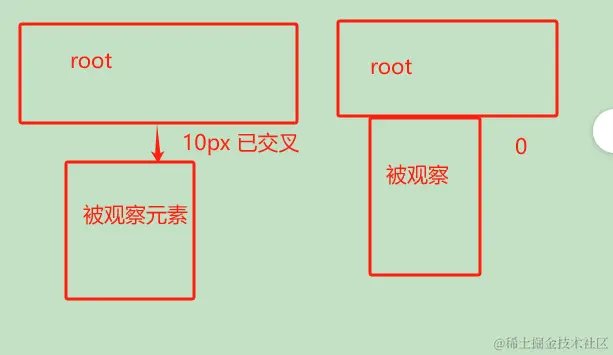
- root: 表示被观察元素与哪个元素是否产生交叉,只能填被观察元素的父元素(祖先元素),默认 null 表示视口元素
- rootMargin: 表示被观察元素与 root 之间的距离,如值为 10 ,则被观察元素与 root 相距小于等于 10 就会视为已交叉;默认为0;如下图
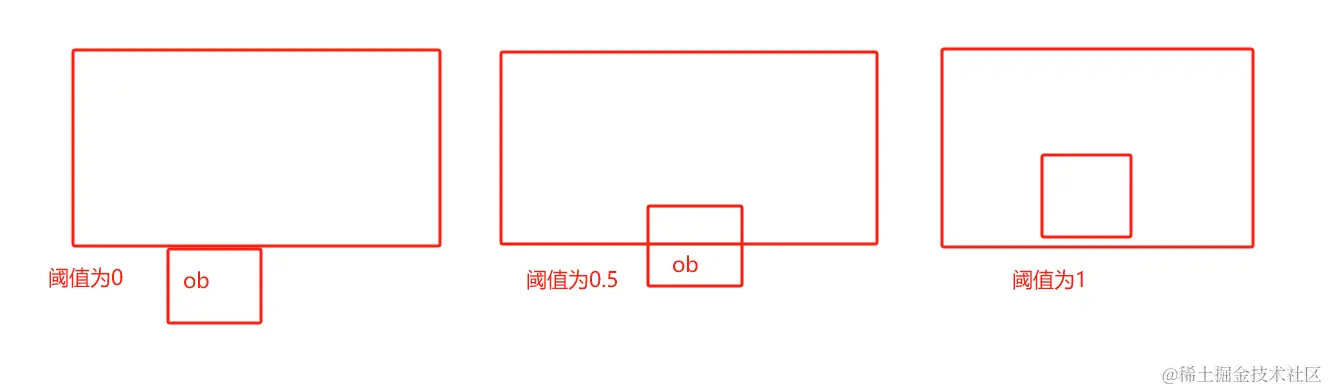
- threshold: 表示交叉的阈值,值为 0-1 之间,默认为0,表示交叉了多少才视为交叉,如下图
- ob.observe(dom) 表示要观察哪个元素;
- 下图为回调函数中的参数;
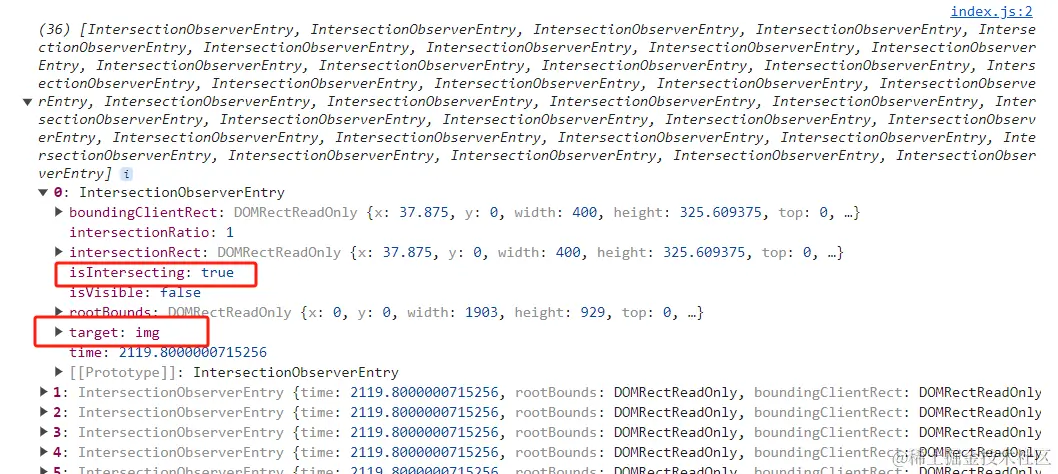
主要关注 isInteresting 与 target 这两个属性
- isInteresting 表示是否交叉
- target 表示目前交叉的元素
回归主题
那么我们回到上面的懒加载的实现,只要监听每张图片是否与视口交叉即可。请看
const ob = new IntersectionObserver(entries => {
entries.forEach(entrie => {
if(entrie.isIntersecting) {
const img = entrie.target;
img.src = img.dataset.src;
ob.unobserve(img)
}
})
}, {
threshold: 0
})
const imgs = document.querySelectorAll('img[data-src]');
imgs.forEach(img => {
ob.observe(img)
})
实现瀑布流,只需监听加载中的元素是否交叉即可
HTML
<!DOCTYPE html>
<html lang="en">
<head>
<meta charset="UTF-8" />
<meta name="viewport" content="width=device-width, initial-scale=1.0" />
<title>Intersection Observer API</title>
<style>
* {
padding: 0;
margin: 0;
}
.wrapper {
display: flex;
flex-wrap: wrap;
}
img {
width: 350px;
margin: auto;
}
.mycircle {
stroke-dasharray: 125.6px;
animation: move linear 1s infinite;
transform-origin: center;
stroke-dashoffset: 30px;
fill: none;
stroke: #666;
stroke-width: 5px;
}
@keyframes move {
0% {
transform: rotate(0deg);
}
100% {
transform: rotate(360deg);
}
}
</style>
</head>
<body>
<div class="wrapper">
<img src="https://t7.baidu.com/it/u=1956604245,3662848045&fm=193&f=GIF">
<img src="https://t7.baidu.com/it/u=4198287529,2774471735&fm=193&f=GIF">
<img src="https://t7.baidu.com/it/u=1223089837,2011531023&fm=193&f=GIF">
<img src="https://t7.baidu.com/it/u=2529476510,3041785782&fm=193&f=GIF">
<img src="https://t7.baidu.com/it/u=727460147,2222092211&fm=193&f=GIF">
<img src="https://t7.baidu.com/it/u=3779234486,1094031034&fm=193&f=GIF">
<img src="https://t7.baidu.com/it/u=2763645735,2016465681&fm=193&f=GIF">
<img src="https://t7.baidu.com/it/u=38705621,4040292245&fm=193&f=GIF">
<img src="https://t7.baidu.com/it/u=3691080281,11347921&fm=193&f=GIF">
<img src="https://t7.baidu.com/it/u=309902808,4013662088&fm=193&f=GIF">
<img src="https://t7.baidu.com/it/u=3915743384,2060495762&fm=193&f=GIF">
</div>
<div class="spin" style="text-align: center">
<svg width="150" height="150" viewBox="0 0 50 50">
<circle class="mycircle" cx="25" cy="25" r="20">
<animateTransform
attributeName="transform"
type="rotate"
from="0"
to="360"
dur="1s"
repeatCount="indefinite"
/>
</circle>
</svg>
</div>
<script src="./index2.js"></script>
</body>
</html>
JS
const img = [
"https://t7.baidu.com/it/u=814015239,3764270914&fm=193&f=GIF",
"https://t7.baidu.com/it/u=735474575,14049849&fm=193&f=GIF",
"https://t7.baidu.com/it/u=55748064,2074988836&fm=193&f=GIF",
"https://t7.baidu.com/it/u=1415984692,3889465312&fm=193&f=GIF",
"https://t7.baidu.com/it/u=1635608122,693552335&fm=193&f=GIF",
"https://t7.baidu.com/it/u=4229354459,3466205664&fm=193&f=GIF",
"https://t7.baidu.com/it/u=334080491,3307726294&fm=193&f=GIF",
"https://t7.baidu.com/it/u=334080491,3307726294&fm=193&f=GIF",
"https://t7.baidu.com/it/u=801209673,1770377204&fm=193&f=GIF",
"https://t7.baidu.com/it/u=1010739515,2488150950&fm=193&f=GIF",
"https://t7.baidu.com/it/u=755629088,1584786319&fm=193&f=GIF",
"https://t7.baidu.com/it/u=2359570649,2574326109&fm=193&f=GIF",
"https://t7.baidu.com/it/u=3326728979,3352004316&fm=193&f=GIF",
]
function loadImage(imgs) {
imgs.forEach(item => {
const img = document.createElement('img')
img.src = item
document.querySelector('.wrapper').appendChild(img)
})
}
const ob = new IntersectionObserver(entries => {
if(entries[0].isIntersecting) {
setTimeout(() => {
loadImage(img)
}, 1000);
}
}, {
threshold: 0
})
const spin = document.querySelector('.spin');
ob.observe(spin)
实现视频暂停
HTML
<!DOCTYPE html>
<html lang="en">
<head>
<meta charset="UTF-8">
<meta name="viewport" content="width=device-width, initial-scale=1.0">
<title>Document</title>
<style>
* {
margin: 0;
padding: 0;
}
.wrapper {
width: 100vw;
height: 100vh;
text-align: center;
}
.video {
margin-top: 100px;
margin-bottom: 1000px;
}
</style>
</head>
<body>
<div class="wrapper">
<video class="video" controls autoplay="true" src="哪吒之魔童降世.Nezha.Birth.of.the.Demon.Child.2019.HD1080P.国语中字.mp4" width="80%"></video>
</div>
<script src="./index3.js"></script>
</body>
</html>
JS
const ob = new IntersectionObserver(entries => {
const video = entries[0].target
if(entries[0].isIntersecting) {
video.play()
} else {
video.pause()
}
}, {
threshold: 1
})
const video = document.querySelector('.video');
ob.observe(video)
真的没了,下次再见!
如果您觉得这篇文章有帮助,请点个赞吧~
相关文章
更多文章 →javascript2026-02-24
navigator.sendBeacon全指南
在前端开发中,埋点系统是必不可少的一环。我们经常需要在用户 关闭页面 、 刷新 或 跳转路由 时,向服务器发送最后一条统计数据(比如用户停留时长、页面跳出率)。 但这看似简单的需求,在实现时却危机四伏:请求发不出去?页面跳转卡顿?今天我们就来聊聊这个问题的终极解决方案 —— 。 一、 痛点与传统方案的挣扎 场景还原 当用户点击关闭按钮时,浏览器会触发生命周期事件( 或 )。如果我们直接使用普通的异步 AJAX ( 或 ) 发送请求,浏览...
学习
javascript2025-11-02
理解浏览器事件系统,从用户点击到事件对象的完整旅程
深入理解浏览器事件系统:从用户点击到事件对象的完整旅程 “当我点击页面按钮时,背后发生了什么?为什么回调函数能收到一个包含丰富信息的event对象?今天,让我们一起揭开浏览器事件系统的神秘面纱。” 一个令人困惑的现象 作为前端开发者,我们每天都在写这样的代码: 这段代码如此熟悉,以至于我们很少停下来思考: 这个 对象到底从哪里来?它为什么能知道点击的精确坐标?为什么能识别是哪个元素被点击了? 更神奇的是,当我们手动创建事件时:...
学习
javascript2025-10-01
实现大文件上传全流程详解
在日常开发中,大文件上传是个绕不开的坎——动辄几百 MB 甚至 GB 级的文件,直接上传不仅容易超时,还会让用户体验大打折扣。最近我用 Vue+Express 实现了一套完整的大文件上传方案,支持分片上传、断点续传、秒传和手动中。 一、先看效果:我们要实现什么? 先上核心功能清单,确保大家明确目标,知道我们要解决哪些实际问题: 大文件分片上传 :将文件切成固定大小的小片段分批上传,避免单次请求超时 秒传 :服务器已存在完整文件时,直接返...
学习
javascript2025-09-18
JavaScript 的多线程能力:Worker
如果你写过一些计算量稍大的 JavaScript 代码,比如图像处理、大量数据排序或者复杂的算法,你几乎肯定遇到过浏览器“卡死”的现象。点击页面没反应,动画也停了,就像整个世界都静止了。 这就是主线程被阻塞的典型后果。因为主线程既要负责执行 JavaScript,又要负责渲染页面、响应用户操作,一旦它被繁重的计算任务占满,就无暇顾及其他,用户体验便直线下降。 这个问题的根源,正是“主线程是单线程的”。那么,如何解决呢? 答案很简单:把这...
学习面试
javascript2025-09-15
一张 8K 海报差点把首屏拖垮
你给后台管理系统加了一个「企业风采」模块,运营同学一口气上传了 200 张 8K 宣传海报。首屏直接飙到 8.3 s,LCP 红得发紫。 老板一句「能不能像朋友圈那样滑到哪看到哪?」——于是你把懒加载重新翻出来折腾了一轮。 解决方案:三条技术路线,你全踩了一遍 1\. 最偷懒:原生 一行代码就能跑,浏览器帮你搞定。 🔍 关键决策点 2020 年后现代浏览器全覆盖,IE 全军覆没。 必须写死 ,否则 CLS 会抖成 PPT。 适用场景...
学习
javascript2025-09-10
🚀 Web Worker让你的应用丝滑
🌟 引言 在日常的前端开发中,你是否遇到过这样的困扰: 大数据处理时页面卡死 :处理几万条数据时,页面直接卡成PPT,用户点击毫无反应 复杂计算阻塞UI :图片处理、数据分析等计算密集型任务让整个应用假死 文件上传/下载卡顿 :大文件操作时,其他功能完全无法使用 实时数据处理性能差 :WebSocket接收大量数据时,页面渲染严重滞后 今天分享6个Web Worker的核心技巧,让你的应用告别卡顿,用户体验丝滑如德芙! 💡 核心技巧...
学习
评论
请登录后发表评论
去登录